

Dorm Desk Setup and Ergonomics Guide for College Students (2026)
Affiliate Disclosure: UniversityParent earns a commission from qualifying purchases made through links on this page. This does not affect our recommendations — we only suggest products we believe are genuinely worth buying.
The dorm desk is small. It is usually cheap. And your student is going to spend thousands of hours at it over the next four years, writing papers, attending virtual lectures, studying for exams, doing problem sets at 1am. How that space is set up has a real effect on both productivity and physical health.
This is not about aesthetics, though an organized desk is also a better-looking desk. It is about making sure your student has a functional workspace that does not leave them with neck pain by midterms.
The Ergonomics Problem Most Students Ignore
Most college students use a laptop flat on a dorm desk. They hunch forward, crane their neck downward, and sit in that position for two to four hours at a stretch. By sophomore year, many have chronic neck and shoulder tension that they assume is just "how college is." It is not. It is a direct result of working with a screen 18 inches below eye level for years.
The fix is inexpensive and straightforward: raise the screen, add a separate keyboard and mouse, and adjust the chair. That is the ergonomic foundation of a functional dorm desk, and every other recommendation in this guide builds from there.
One email a week, for parents doing this right now
The deadlines, checklists, and conversation scripts that actually matter at each stage of the year. Free, and you can unsubscribe anytime.
Looking for the free toolkits? They are on our resources page, no email required.
The Core Setup: Laptop Stand, Keyboard, Mouse
Laptop Stand

Lamicall Adjustable Laptop Stand
$36
Raises the screen to eye level, the single biggest fix for desk-related neck and shoulder strain.
A laptop stand that raises the screen to roughly eye level is the single highest-impact purchase for a student who spends significant time at their desk. Aluminum stands are the most popular choice, they are lightweight, affordable ($25-40), and double as a heat management tool by allowing airflow under the laptop. View on Amazon →
What to look for:
The right height is eye level when seated with good posture. Most adjustable stands can accommodate this; fixed-height stands are designed to hit approximately the right range for most people. Look for one that is stable (wobble on a cheap stand gets annoying fast), has rubberized grips to prevent slipping, and folds flat for transport.
If your student carries the laptop to class daily and wants the stand to travel, look for a foldable model that fits in a backpack pocket. If the stand stays on the desk permanently, a heavier base is fine.
Wireless Keyboard

Logitech Pebble Keys 2 K380s Wireless Keyboard
$34
Bluetooth means no dongle taking up a USB port. Quiet keys matter in a shared room.
Once the laptop is elevated to eye level, typing directly on it is awkward. An external keyboard solves this and lets your student position the typing surface at a comfortable height with elbows at roughly 90 degrees. View on Amazon →
For most students, a compact 75% or tenkeyless keyboard is the right size for a dorm desk, it leaves room on a small desk without the numpad that most students do not use. Mechanical keyboards are popular and satisfying but louder than membrane keyboards; for a student with a roommate, a quiet mechanical switch (Cherry MX Silent, Gateron Silent) or a good membrane keyboard is more considerate.
Budget recommendation: Logitech K380 ($40) is reliable, compact, connects to three devices via Bluetooth, and works on Mac and Windows. It is probably the most-recommended keyboard in this category for good reason.
Wireless Mouse

Logitech M240 Silent Bluetooth Mouse
$20
Silent clicks, which a roommate on the other side of the room will notice and appreciate.
A touchpad is fine for casual use; it is suboptimal for long writing and research sessions. A wireless mouse significantly reduces wrist strain compared to a trackpad for extended desktop work and improves precision for anything involving spreadsheets, design work, or long document navigation. View on Amazon →
Logitech again dominates this category for good reason: the MX Master 3S and M720 Triathlon are excellent for power users; the M510 and M330 Silent are more than adequate for students who just want a reliable mouse without overthinking it. Budget $25-45 for a good wireless mouse.
Lighting: Why It Matters More Than You Think
Most dorm room lighting is overhead fluorescent or incandescent, usually positioned to illuminate the room generally rather than a workspace specifically. Working under poor task lighting for long periods causes eye strain, headaches, and fatigue, particularly during late-night study sessions.
Desk Lamp

Airlonv LED Desk Lamp with Clamp
$20
Clamps on instead of taking up desk surface, and dims for late-night studying without waking a roommate.
A good desk lamp is not a luxury. It is a tool. Look for:
Adjustable brightness. A lamp that can go from bright (daytime work) to dimmer warm light (evening sessions that do not interfere with sleep) is significantly more useful than a fixed-brightness lamp.
Color temperature control. Cooler light (5000-6500K) is better for focus and alertness. Warmer light (2700-3000K) is better in the evening and less disruptive to sleep rhythms. Lamps with adjustable color temperature handle both scenarios. View on Amazon →
USB charging port. Many desk lamps include a USB-A or USB-C charging port, which is useful on a desk where wall outlet access may be limited.
Size appropriate for the desk. A lamp with a small footprint and flexible gooseneck arm is better suited to a small dorm desk than a wide base lamp.
Budget $25-50 for a quality adjustable LED desk lamp. This is one of the categories where the cheap version and the good version cost almost the same and perform very differently.
Blue Light Glasses

Blue Light Blocking Glasses
$8
Cheap insurance against the eye strain from hours of screen time under dorm lighting.
For students who spend late evenings at screens, blue light glasses reduce the high-energy light that can suppress melatonin production and interfere with sleep. The research on their effectiveness is mixed, but many students find them helpful for evening study sessions. Worth knowing about; not mandatory. View on Amazon →

Giantex Desktop Bookshelf Hutch Organizer (White)
A desktop bookshelf is the fastest way to get textbooks, a monitor riser, and supplies off the desk surface and into reach. This five-shelf hutch sits on top of the desk, holds a 27 inch monitor on top, and clears the workspace without any wall mounting.
Organization: Making a Small Space Work
Dorm desks are typically 40-48 inches wide and 20-24 inches deep. That is not much space for a laptop, stand, keyboard, mouse, lamp, notebooks, and whatever else accumulates. Organization matters more here than it does at a larger home desk.
Desk Organizer

Greenco Mesh Desk Organizer, 6 Compartments
$12
Six compartments keep pens, cables, and small supplies from disappearing into a small desk drawer.
A small desk organizer with compartments for pens, highlighters, scissors, sticky notes, and small supplies keeps the desktop from accumulating clutter. Look for one that fits the depth of the desk, wide organizers on shallow desks hang over the edge awkwardly. View on Amazon →
Cable Management

Lamicall Cable Management Clips (8-Pack)
$10
Keeps charging cords off the desk and floor in a small room.
The desk cable situation in a dorm room with a laptop stand, external monitor, keyboard, mouse, lamp, phone charger, and power strip gets chaotic quickly without some basic management. A few simple solutions:
Velcro cable ties ($10 for a pack) are flexible and reusable, much better than zip ties for a setup that changes periodically. Browse velcro cable ties on Amazon →
A cable management tray that attaches under the desk and holds the power strip and excess cable length keeps the desktop clear. Most can be attached with adhesive strips that comply with dorm no-drill rules. Browse under-desk cable trays on Amazon →
A small desktop charging station with USB ports at or near the desk reduces the number of wall adapters competing for limited outlets. Compact units like this fit easily on a crowded desk. View on Amazon →
Whiteboard or Corkboard
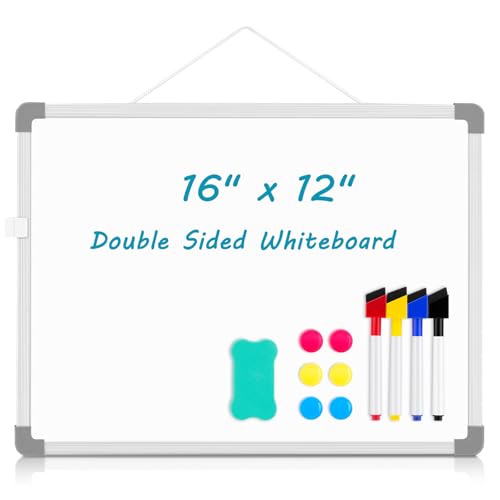
AMUSIGHT Double-Sided Whiteboard 16×12″
$10
Small enough for a shared desk, doubles as a reminder board for deadlines.
Many dorms allow command strip mounting (check your student's specific housing contract, as rules vary). A small whiteboard above the desk for deadlines, reminders, and quick notes is useful for visual learners. A corkboard serves the same purpose for students who prefer physical materials. View on Amazon →
Vertical Storage
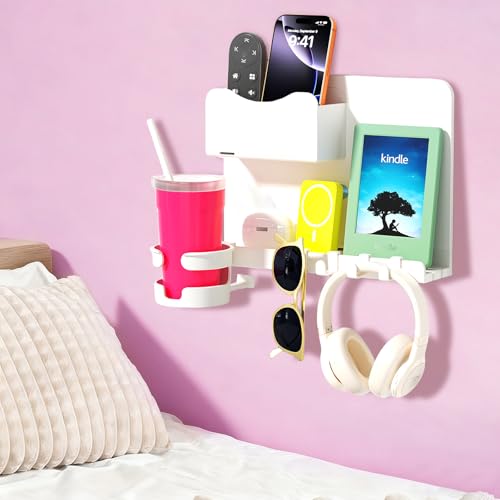
Floating Adhesive Wall Shelf for Dorm
$27
Adds storage without using any desk or floor space, the two things dorm rooms are shortest on.
Desk real estate is limited; vertical space is not. A small monitor riser with a drawer creates under-screen storage for notebooks, hard drives, or miscellaneous items. Stackable desktop shelves add vertical organization for students who have more materials on their desk than the surface can absorb. Browse monitor risers on Amazon →
The Chair Situation
This is the one ergonomic factor you probably cannot control entirely. Dorm desk chairs are what they are, usually adjustable in height, usually adequate for short sessions, often less comfortable than students would like for long ones.
If your student is comfortable with the provided chair, great. If not, a few options:
A seat cushion. A memory foam or gel cushion adds meaningful comfort to a hard chair and costs $20-35. This is one of the more underrated purchases for students who sit for long study sessions. Browse seat cushions on Amazon →
A lumbar support pillow. If the provided chair lacks lower back support, a small lumbar pillow placed at the curve of the lower back dramatically improves posture and comfort. Browse lumbar support pillows on Amazon →
Bringing a better chair from home. Some students bring a good desk chair from their bedroom at home. This is only worth doing if the chair is meaningfully better than what the school provides and fits in the room (check the floor plan, some dorm rooms are genuinely small). An office chair in a 12×10 room with a bed, dresser, wardrobe, and shared floor space may not fit comfortably.
External Monitor: Optional But High ROI
An external monitor is the single largest productivity upgrade for students who do substantial writing, research, or coding at their desk. The ability to have a document open full-screen on one monitor while research or reference material is open on the other, or a video lecture on one side and notes on the other, adds real efficiency to work sessions.
A 24-inch 1080p monitor costs $150-180. For a student who will spend 3-4 hours a day at a desk over four years, the cost-per-hour of use is low. Browse 24-inch monitors on Amazon →
What to look for:
- 24-inch is the right size for a dorm desk. Larger takes too much surface area.
- 1080p resolution is sufficient for general academic and productivity use. 1440p costs more and is only meaningful for design or video work.
- IPS panel (better colors and viewing angles) over TN panel for the same price.
- HDMI and USB-C inputs to cover most laptop connection options.
- Built-in speakers are convenient but optional since most students use headphones.
If buying an external monitor, also buy an HDMI cable or USB-C to DisplayPort cable appropriate for the laptop. Not all laptops include these in the box.
What to Skip
Expensive desk accessories marketed to "productivity influencers." Cable raceways that cost $80, designer desk pads that cost $120, minimalist pen holders at $45, the dorm desk does not need any of these. The functional alternatives cost a fraction of the price.
A standing desk converter. The dorm desk is fixed. Aftermarket standing desk converters that sit on top of it are bulky, expensive ($150-300), and rarely used for more than a week after novelty wears off. Not a college purchase.
A second laptop. Some students consider a cheap Chromebook as a "backup." In practice, this splits attention and creates a device to manage. A cloud backup and a campus computer lab are better solutions for device failure scenarios.
Desk Setup Checklist
The Foundation (High Priority)
- Laptop stand that raises screen to eye level View on Amazon →
- Wireless keyboard View on Amazon →
- Wireless mouse View on Amazon →
- Adjustable LED desk lamp View on Amazon →
Organization
- Desk organizer with compartments View on Amazon →
- Compact charging station with USB ports View on Amazon →
- Velcro cable ties for cable management Browse velcro cable ties on Amazon →
Comfort
- Seat cushion (if dorm chair is uncomfortable) Browse seat cushions on Amazon →
- Lumbar support pillow (optional) Browse lumbar support pillows on Amazon →
Upgrades (Optional)
- External monitor (24-inch, 1080p IPS) Browse external monitors on Amazon →
- Monitor riser with under-desk storage Browse monitor risers on Amazon →
- Small whiteboard for deadlines and reminders View on Amazon →
- Under-desk cable tray for power strip Browse cable management trays on Amazon →
School-Specific Notes
Small Dorm Rooms
Some schools, particularly older urban campuses and highly selective schools with legacy housing, have genuinely small rooms. NYU, Georgetown, and some Ivy League dorms can be tighter than the national average. For small rooms, prioritize vertical organization over horizontal spread, choose a foldable laptop stand, and skip the external monitor in favor of a more capable laptop display.
Large Flagship Rooms
Many newer residence halls at large public universities have more generous room dimensions. Here there is more flexibility, a full-size monitor, a proper cable management setup, and a floor lamp to supplement the desk lamp all fit without consuming the room.
Study Lounges as an Overflow Option
Most residence halls have study lounges with large tables, good lighting, and outlets. Encourage your student to use these for marathon study sessions rather than trying to replicate a library setup in their room. The ergonomics of a study lounge table are often better than a dorm desk, and the change of environment improves focus for many students.
Related guides:
Complete college tech setup: phone, tablet, software
Full dorm packing checklist
Best laptops for college students 2026
Last updated: May 2026. Product availability and prices subject to change.
Frequently Asked Questions
What does a college student actually need for a dorm desk setup?
The items that make the biggest functional difference are a laptop stand to bring the screen to eye level (the single biggest ergonomic improvement), an external keyboard and mouse so the laptop can sit up and remain usable, and a desk lamp with adjustable brightness for evening and late-night studying. Everything beyond that is useful but not responsible for the neck and back issues most dorm students eventually develop.
Is an external monitor worth buying for a dorm room?
For most students, yes. A 24-inch monitor paired with a laptop creates a significantly more functional workspace for writing papers, working across multiple documents, and attending virtual lectures. A mid-range one runs $150 to $200 and makes more day-to-day difference than most other desk purchases. Models with USB-C that also charge the laptop are worth the small premium.
What lighting is best for a dorm desk?
A lamp with a warm-to-cool adjustable color temperature, positioned to the side of the screen. Dorm rooms typically rely on a single overhead fixture, which creates glare on screens and is hard on the eyes during extended sessions. Placing your lamp to the side (not in front of or directly above the screen) solves the glare problem without any installation or landlord permission.
What should we avoid buying for a dorm desk?
Decorative items that reduce usable workspace feel nice to set up but create clutter by week three (small plants, photo frames, and figurines are the main culprits). Skip the full desktop tower: a laptop with a stand does the same job in a fraction of the space. Hold off on desk organizers until your student has been there a few weeks and knows what actually needs organizing.
How do I prevent neck and back pain from studying at a dorm desk?
The ergonomics problem is almost always the laptop position. Keeping the screen flat on a desk forces the neck to crane forward and down for hours at a time. Raising the laptop to eye level with a stand, then adding an external keyboard and mouse so the hands can rest naturally, solves most of the issue. For the back, a small lumbar pillow on the dorm chair handles the rest.